How to Protect Your JavaScript Code with MadLoader's Free JS Obfuscator
ZeroByteZ
Author
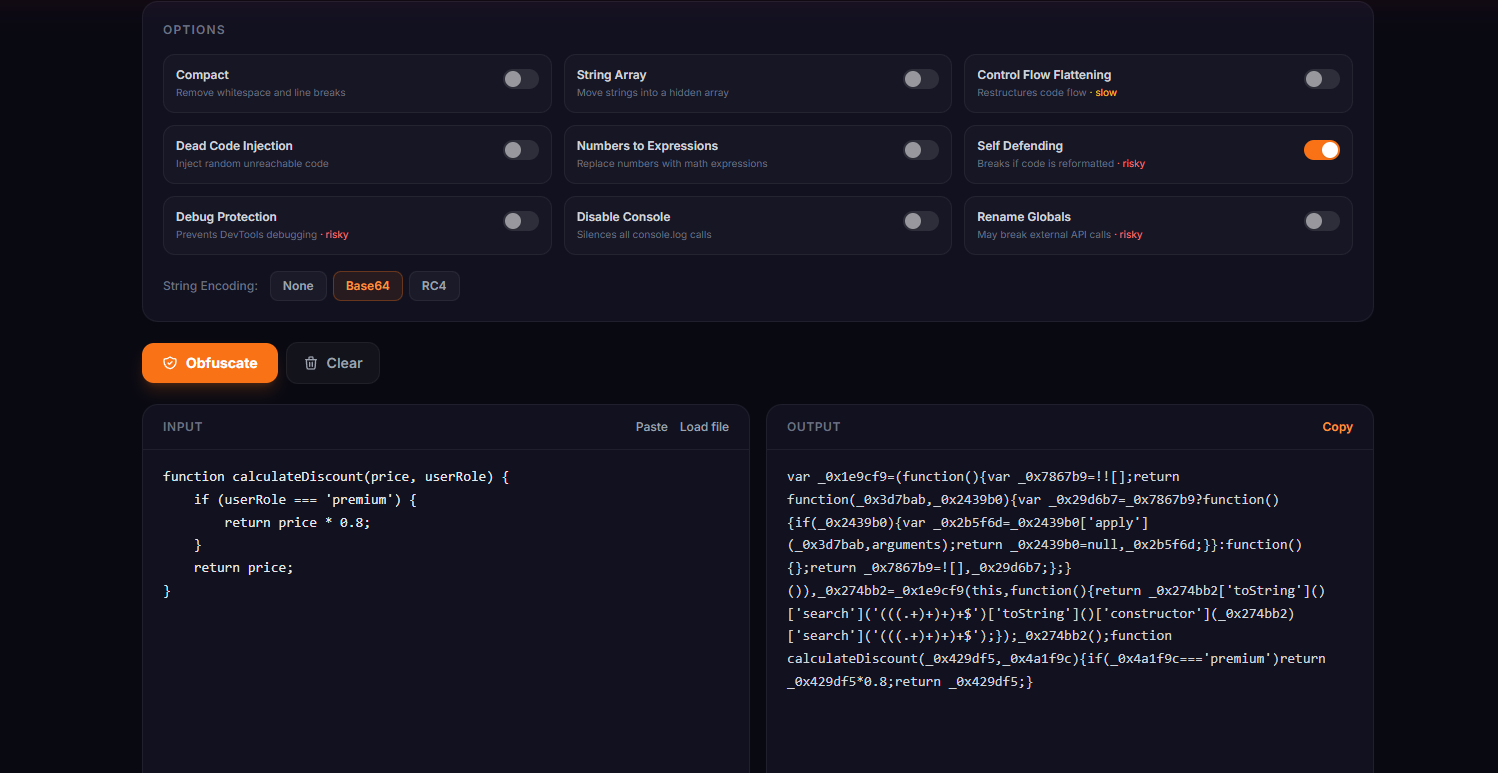
If you've ever right-clicked a webpage and hit "View Source," you already understand the problem with JavaScript. Your code logic, API endpoints, validation rules, everything is sitting right there in plain text for anyone to read, copy, and reverse engineer. Not great.
Obfuscation won't make your code uncrackable. Nothing will. But it raises the bar high enough that most people won't bother. That's the goal. We built a free, browser-based JS obfuscator into MadLoader Tools so you can do it in seconds without uploading your code to some random server.
What Is JavaScript Obfuscation?
Obfuscation transforms your readable source code into something that does exactly the same thing but is extremely difficult to read or understand. Think of it like this, before obfuscation:
function calculateDiscount(price, userRole) {
    if (userRole === 'premium') {
        return price * 0.8;
    }
    return price;
}
After obfuscation with string encoding and variable renaming:
const _0x3f2a=['premium'];(function(_0x4b1c,_0x3f2a){...}(_0x1a2b,0x1c2));
function _0x1a2b(_0x4b1c,_0x3f2a){const _0x1c2d=_0x2e3f();...}
Same output. Zero readability.
Why Bother Obfuscating?
A few real reasons:
- Protect business logic. Pricing algorithms, scoring systems, validation rules. If it runs client-side, anyone can steal it without obfuscation.
- Hide API keys and endpoints. You shouldn't put secrets in client-side JS to begin with, but obfuscation at least slows down someone who's scraping your endpoints.
- Deter copy-paste theft. Scripts, widgets, and tools you distribute get copied all the time. Obfuscation makes it annoying enough that most people give up.
- License enforcement for distributed scripts. If you sell or license JS code, obfuscating the builds ensures your customers can't just hand the source to a competitor.
How to Use the MadLoader JS Obfuscator
Head to madloader.net/pages/tools/js-obfuscator/.
Step 1 - Paste or load your code
Drop your .js file directly into the input panel, use Load file, or click Paste to pull from your clipboard. The input shows live character count, line count, and file size at the bottom.
Step 2 - Pick a preset
There are three presets for different situations:
| Preset | Best for | Output size |
|---|---|---|
| Low | General use, fast output, minimal size increase | ~1.5× original |
| Medium | Production code, good protection vs. performance balance | ~3–5× original |
| High | Maximum protection — security-critical scripts | ~6–10× original |
Most people should start with Medium. High protection is powerful but the output file gets large and runs slightly slower, so don't use it on performance-critical code paths.
Step 3 - Tune the settings (optional)
Click Settings to open the options panel. Here's what each toggle does:
Compact - Strips all whitespace and line breaks. Always leave this on unless you're debugging the obfuscated output.
String Array - Moves all string literals out of the code and into a hidden array that gets accessed through an indexed lookup function. Makes strings like 'admin' or 'https://api.example.com' completely invisible in the source.
Control Flow Flattening - Restructures your code's control flow (if/else, loops, switch statements) into a giant state machine. Very hard to follow manually. Note that this one slows down the obfuscated code a bit. Use the threshold slider if you're on a performance budget.
Dead Code Injection - Scatters random, unreachable code throughout the output. Makes automated analysis much noisier and harder to follow.
Numbers to Expressions - Replaces numeric literals with math expressions. So 100 becomes something like (0x64 + 0x0). Subtle but adds noise.
Self Defending - The obfuscated code checks its own formatting and will break if someone runs a beautifier on it. Useful but risky — only enable this if the code doesn't need to be re-processed later.
Debug Protection - Aggressively detects DevTools being open and loops the debugger, making step-through debugging nearly impossible. Risky on some browsers, test before shipping.
Disable Console - Overrides console.log, console.warn, and friends so they do nothing. Useful for production builds where you want to silence logging without removing log calls from source.
Rename Globals - Renames global-scope identifiers. Can break code that relies on named globals being accessible externally, so only use this if your script is fully self-contained.
Step 4 - Choose string encoding
Under the options panel you'll find three encoding modes for the string array:
- None - Strings are shuffled and accessed via lookup, but not encoded
- Base64 - Strings are Base64 encoded before being placed in the array (good default)
- RC4 - Stronger encoding with a runtime key. Harder to reverse but adds a bit of overhead
Base64 is the sweet spot for most use cases. Use RC4 if you're on High protection and really want to make string extraction painful.
Step 5 - Obfuscate and copy
Hit the orange Obfuscate button. The library loads on first use (about 200KB from jsDelivr) and then runs entirely in your browser. Your code never touches a server.
The output panel shows the obfuscated result with size and the ratio compared to your original. Click Copy and you're done.
What the Output Size Ratio Means
The output is always larger than the input, sometimes a lot larger. Here's a rough guide:
1.5×- Very light. Mostly just renamed variables and compacted whitespace.3–5×- Standard. String array encoding adds significant overhead.6–10×- Heavy. Control flow flattening + dead code injection inflates output considerably.
For web delivery, make sure you're gzip/Brotli compressing your JS before serving it - the obfuscated output often compresses surprisingly well despite looking like chaos.
What Obfuscation Doesn't Do
Worth being honest about the limits:
It's not encryption. The code still has to run in the browser, which means with enough patience a skilled developer can reverse it. Tools like js-beautify and deobfuscators exist. Obfuscation raises the cost of reversing, it doesn't make it impossible.
It won't protect secrets that shouldn't be client-side. Private API keys, passwords, server-side business logic - these should never be in client-side JavaScript in the first place. Obfuscation is not a substitute for proper architecture.
Self Defending and Debug Protection can be tricky. These options are powerful but they can cause unexpected behaviour in certain environments. Always test your obfuscated output properly before shipping.
The Tool Is Powered by javascript-obfuscator
Under the hood we use the javascript-obfuscator library, the same open-source engine behind obfuscator.io, which is the most widely used JS obfuscation tool out there. It does real AST (Abstract Syntax Tree) parsing, not regex substitution, so it handles complex code correctly.
The library is loaded from jsDelivr on first use and runs completely client-side. You can disconnect from your network after the page loads and it'll still work.
Try It Now
No account. No upload. No nonsense.